Best Proxies for Multiple Instagram Accounts in 2026
Running more than one Instagram account is normal now, for agencies, resellers, creators, and growth teams. Those accounts stay separate only if the infrastructure under them does. An antidetect browser like ixBrowser keeps each profile's fingerprint distinct, but the browser is only half the setup. The other half is the proxy, because the IP is one of the first things Instagram reads when it decides whether two accounts belong to the same person. Below is which proxy type actually holds up for multiple Instagram accounts, how many accounts you can run per IP, and the setup that keeps them from getting linked.
How Instagram Links Multiple Accounts
Before picking a proxy, it helps to know what Instagram is matching on. Detection is not one check, it is several signals scored together:
-
IP and ASN reputation: the address and the network it belongs to. Databases like MaxMind label each range, and a hosting ASN reads as a server, not a phone.
-
Network fingerprint: the TCP/IP stack behind the connection, which tools like p0f read passively. A profile claiming to be an iPhone on a Linux server stack is a contradiction.
-
The verification number: a VoIP number looks different from a real carrier number.
-
Device and browser fingerprint: canvas, fonts, screen, user agent, the layer ixBrowser handles.
-
Behavior: reused numbers or emails, fast location jumps, timezone mismatches, and identical action patterns across accounts.
The proxy owns the first two of those, and it sets your apparent location. Get the IP wrong and the cleanest browser profile still sits on a flagged address.
What Makes a Proxy Good for Instagram
Not every proxy suits a logged-in, long-lived Instagram account. Four things matter:
-
Real mobile carrier IPs. Instagram is a phone-first app, so traffic from a mobile carrier is what it expects. Carriers put many subscribers behind one address with carrier-grade NAT, and Cloudflare notes a single IPv4 address can represent hundreds or even thousands of users, so Instagram cannot ban a carrier IP without hitting real people. That gives mobile the highest trust of any type.
-
One stable IP per account. A logged-in account should keep the same IP session to session. Rotating the IP mid-session, which a rotating pool does by default, looks like account takeover and is a common flag.
-
Geo and timezone consistency. The proxy location, the browser timezone, and the account’s history should agree.
-
A matching network fingerprint. The TCP/IP stack should read like the device the profile claims to be.
Proxy Types for Instagram, Compared
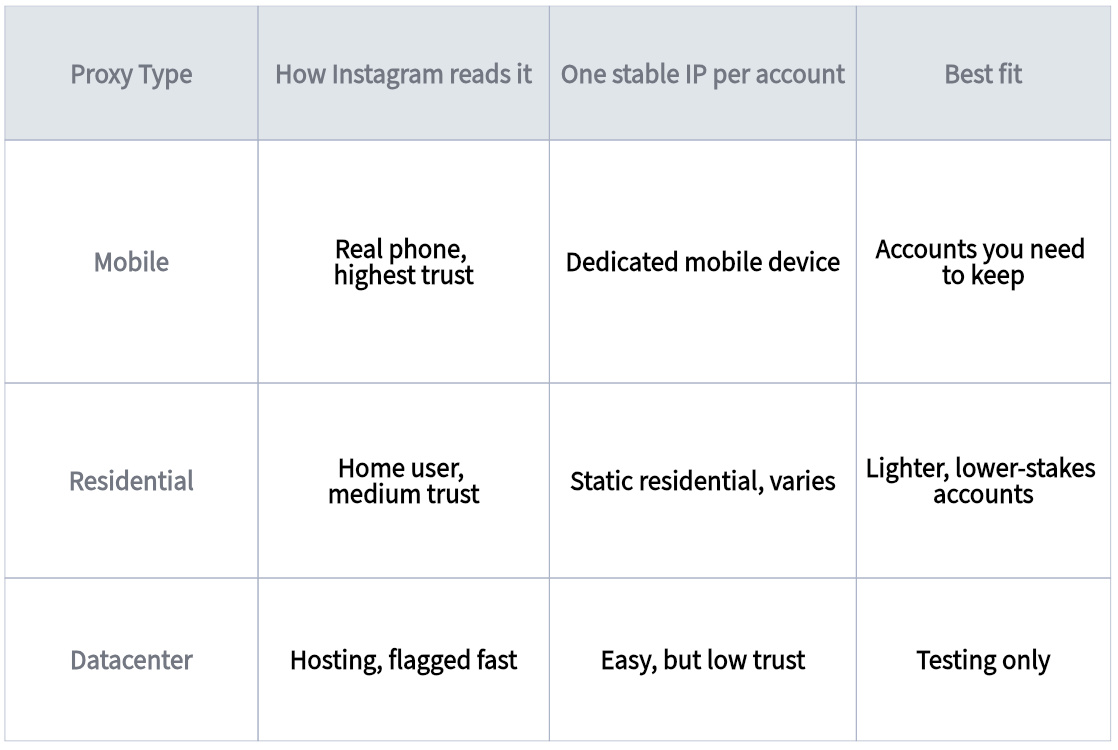
Mobile is the strongest option for accounts you actually care about. Residential can work for lighter, lower-stakes accounts where cost matters more than surviving every check. Datacenter proxies get flagged by their hosting ASN quickly, so they are fine for testing and little else on Instagram.
How Many Instagram Accounts Per IP?
The safest answer is one dedicated IP per account you care about. Instagram treats accounts sharing an IP as related, so one address per identity keeps them cleanly separate. If you have to share, keep it to a small cluster, around three to five accounts on one IP at most, and expect them to rise or fall together if one gets flagged. The moment an account matters, give it its own mobile proxy on a dedicated mobile device and leave it there.
The Setup That Actually Holds
Put together, a durable multi-account Instagram stack looks like this:
-
One ixBrowser profile per account, each with its own fingerprint, and never log two accounts into the same profile.
-
One dedicated mobile IP per account, kept stable, with the browser timezone and language matched to the proxy location.
-
A non-VoIP number per account for verification, from a real carrier, never reused across accounts, since a shared number links them together during a ban.
-
A warm-up period before any real use. New accounts sit in a watchful early window, so ramp slowly, roughly two weeks on Instagram, and keep each account on its own IP the whole time. Switching IPs mid-warm-up is a common trigger.
Match the browser profile, the IP, the number, and the behavior per account, and Instagram has nothing linking one to the next.
FAQ
Does Instagram detect proxies? It can. Instagram reads the IP’s type and network, so a datacenter proxy is easy to spot by its hosting ASN. A real mobile proxy is far harder to flag, because it is a genuine carrier IP shared with real subscribers, which is exactly what Instagram expects from a phone.
How many Instagram accounts can you run on one IP? One per account is safest for anything you care about, since Instagram treats accounts on the same IP as related. If you share, keep it to roughly three to five in a cluster and accept that they are linked. A dedicated mobile IP per account is the clean setup.
Can residential proxies work instead of mobile proxies for Instagram? Yes, for lighter or lower-stakes accounts. Residential IPs read as home users and hold up on easier checks. For accounts you need to keep, mobile carries more trust, because Instagram is a phone-first app and a carrier IP is what it expects.
Do datacenter proxies work for Instagram? Not well. Datacenter IPs are labeled as hosting in IP databases and get flagged quickly on a platform as strict as Instagram. They suit testing, not real accounts.
Why does Instagram keep asking for phone verification? Usually because something looks off: a new account, a flagged or datacenter IP, a VoIP number, or activity that ramped too fast. A clean mobile IP and a non-VoIP carrier number cut down how often it happens.
Are proxies legal to use with Instagram? Using a proxy is legal, and proxies are a standard networking tool. Running many accounts can break Instagram’s terms of service, which is separate from the law, so weigh that against what you are doing.