6 Antidetect Browsers realfp Comparison, Which One Comes Out on Top?
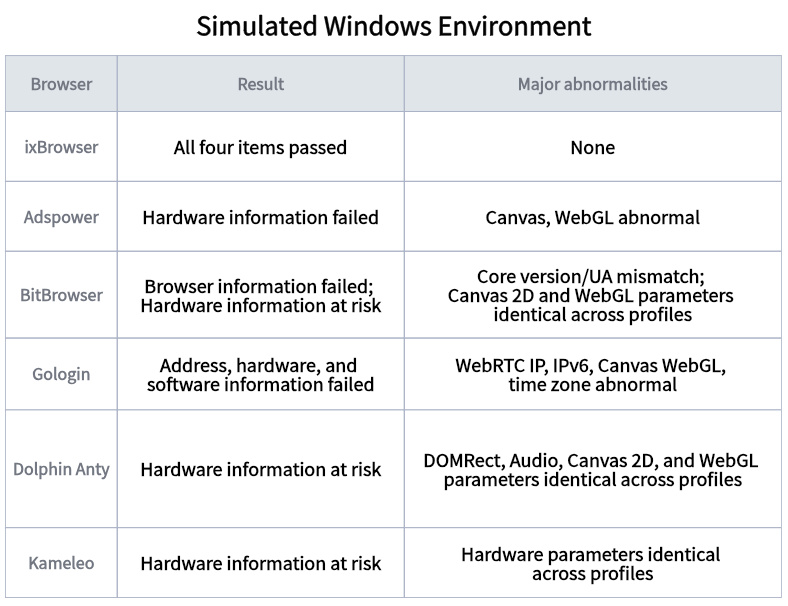
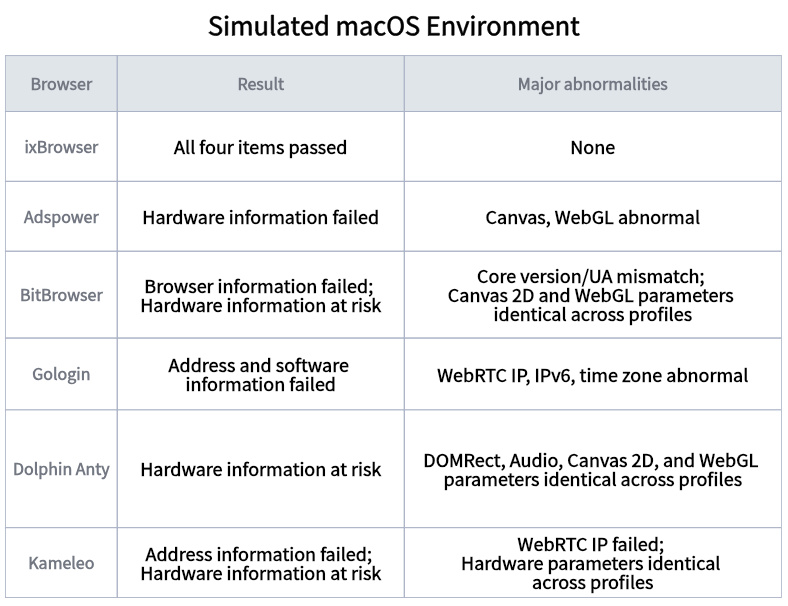
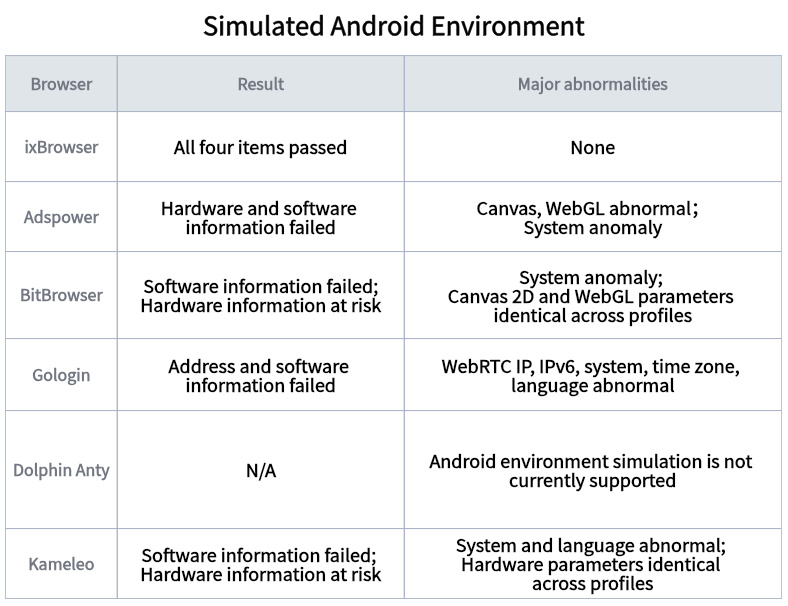
Core conclusion: In this test, ixBrowser passed all four categories—browser information, address information, hardware information, and software information—under all four simulated environments: Windows, macOS, Android, and iOS.
In scenarios such as multi-account operations, e-commerce, advertising, and social media management, browser environment isolation is not just about “changing the IP.” Websites can read parameters such as UA, Canvas, WebGL, WebRTC, time zone, and language, and combine them into a relatively stable browser fingerprint.
Therefore, for antidetect browsers, what truly matters is not simply “modifying parameters,” but whether the modified parameters remain logically consistent and whether different browser environments have sufficient differentiation.
About realfp
realfp.com is a browser fingerprint security detection platform. It simulates the identification logic of mainstream risk control systems and focuses on detecting the authenticity, consistency, and anti-detection capability of browser fingerprints.
The detection results from realfp.com can be widely used for antidetect browser selection evaluation, optimization and verification of fingerprint configuration plans, and risk prediction for multi-account operation environments. Its detection dimensions cover the core fingerprint parameters relied on by current mainstream risk control systems and have high industry reference value.
What does realfp mainly detect?
Browser information: User-Agent, version, core, core version
Address: IP, IP (WebRTC), location, DNS server
Hardware: Base, WebGL, WebGPU, DOMRect, Audio, Canvas 2D, Canvas WebGL
Software: system, language, time, time zone, fonts
realfp Test Results Comparison
Simulated Windows Environment
Simulated macOS Environment
Simulated Android Environment
Simulated iOS Environment
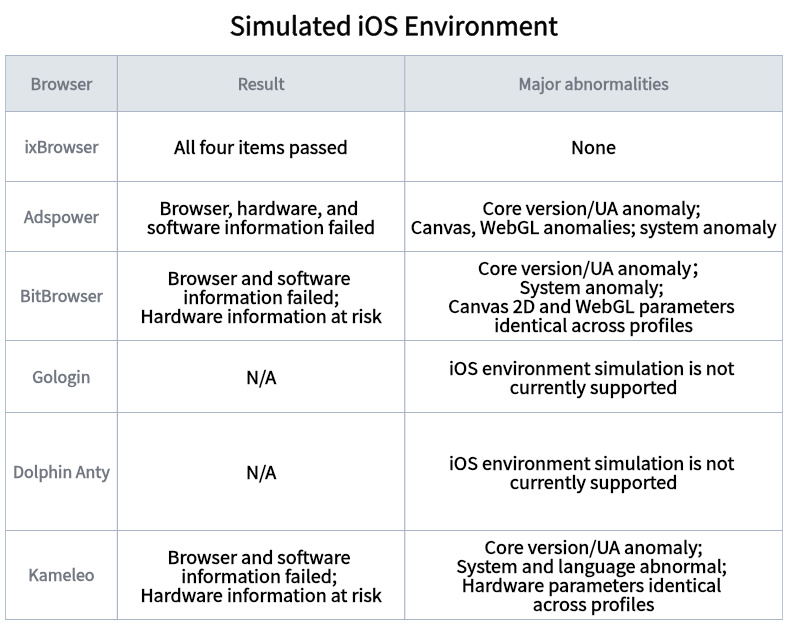
Notice: In this comparison test, ixBrowser, AdsPower, GoLogin, and Kameleo used the 151 kernel, BitBrowser used the 150 kernel, and Dolphin Anty used the 138 kernel.
Summary
From the results of this realfp test, ixBrowser showed the best completeness and stability.
Whether simulating Windows, macOS, Android, or iOS, ixBrowser's browser information, address information, hardware information, and software information all passed with green status. During the test, there were no core version/UA mismatches, WebRTC IP anomalies, Canvas/WebGL anomalies, system anomalies, time zone anomalies, or language anomalies, nor were there any alerts that hardware fingerprints were completely identical across multiple profiles.
In other words, under the conditions of this test and the current realfp detection rules, ixBrowser not only addressed whether individual parameters were normal, but also demonstrated better completeness in the consistency among browser version, network environment, software and hardware fingerprints, and operating system information.
In scenarios such as multi-account operations, e-commerce, advertising, and social media management, browser environment isolation is not just about “changing the IP.” Websites can read parameters such as UA, Canvas, WebGL, WebRTC, time zone, and language, and combine them into a relatively stable browser fingerprint.
Therefore, for antidetect browsers, what truly matters is not simply “modifying parameters,” but whether the modified parameters remain logically consistent and whether different browser environments have sufficient differentiation.
About realfp
realfp.com is a browser fingerprint security detection platform. It simulates the identification logic of mainstream risk control systems and focuses on detecting the authenticity, consistency, and anti-detection capability of browser fingerprints.
The detection results from realfp.com can be widely used for antidetect browser selection evaluation, optimization and verification of fingerprint configuration plans, and risk prediction for multi-account operation environments. Its detection dimensions cover the core fingerprint parameters relied on by current mainstream risk control systems and have high industry reference value.
What does realfp mainly detect?
Browser information: User-Agent, version, core, core version
Address: IP, IP (WebRTC), location, DNS server
Hardware: Base, WebGL, WebGPU, DOMRect, Audio, Canvas 2D, Canvas WebGL
Software: system, language, time, time zone, fonts
realfp Test Results Comparison
Simulated Windows Environment
Simulated macOS Environment
Simulated Android Environment
Simulated iOS Environment
Notice: In this comparison test, ixBrowser, AdsPower, GoLogin, and Kameleo used the 151 kernel, BitBrowser used the 150 kernel, and Dolphin Anty used the 138 kernel.
Summary
From the results of this realfp test, ixBrowser showed the best completeness and stability.
Whether simulating Windows, macOS, Android, or iOS, ixBrowser's browser information, address information, hardware information, and software information all passed with green status. During the test, there were no core version/UA mismatches, WebRTC IP anomalies, Canvas/WebGL anomalies, system anomalies, time zone anomalies, or language anomalies, nor were there any alerts that hardware fingerprints were completely identical across multiple profiles.
In other words, under the conditions of this test and the current realfp detection rules, ixBrowser not only addressed whether individual parameters were normal, but also demonstrated better completeness in the consistency among browser version, network environment, software and hardware fingerprints, and operating system information.